アプリケーション情報を記録する方法 (C#)
.NET Framework でアプリケーション情報を保存する方法について記載します。
.NET Framework でアプリケーション情報を保存する方法はいろいろあります。
方式の比較:
方式
説明
保存場所
1
ApplicationSettings
Properties.Settings に保存(最も実務的)
AppData\Local\<Company>\<App>\<Version>\user.config
2
Windows レジストリ
Windows レジストリに保存
HKEY_CURRENT_USER\Software\<Company>\<App>\
3
JSON ファイル
独自 JSON ファイルに保存
任意の場所%APPDATA%\<Company>\<App>\settings.json
4
XML ファイル
独自 XML ファイルに保存
任意の場所%APPDATA%\<Company>\<App>\settings.xml
5
INI ファイル
独自 INI ファイルに保存
任意の場所%APPDATA%\<Company>\<App>\settings.ini
補足など:
1. Windows アプリ開発では、AppData\Local と
AppData\Roaming の使い分けが重要
Local と Roaming の比較・違い
種別
説明
環境変数
フォルダの場所
他
Local そのPC固有のデータ
%LOCALAPPDATA% C:\Users\<ユーザー名>\AppData\Local
Roaming ユーザーについて回る設定データ
%APPDATA%
C:\Users\<ユーザー名>\AppData\Roaming 企業の Active Directory 環境では、ログオン時に別PCへ同期されることがあります。そのため Microsoft は、
小さな設定データ を置く場所として Roaming を想定しています。
2. セキュリティ観点
どの方式を使用する場合も、下記セキュリティ視点での注意をしましょう。
パスワードやトークンはレジストリや設定ファイルに保存しない
ローカルに保存する場合は暗号化を検討する
機密情報は AppData よりも専用の保護された保存方法が必要
1. ApplicationSettings
🔗
.NET, .NET Framework アプリでは、特に理由なければ通常はこの方法でアプリ情報を保存するのが最も簡単で良いでしょう。
✔ 特徴
.NET Framework 標準機能
とても少ないコードで実現できる
自動保存・自動読み込みが可能
WinForms / WPF 両方で使える
[評価環境]
コンパイラ :
Visual Studio 2026,
Version 18.10.0
OS :
Windows11,
25H2
保存例(WinForms, C#)
private void Form1_Load(object sender, EventArgs e)
{
    if (Properties.Settings.Default.Location != Point.Empty)
    {
        this.Location = Properties.Settings.Default.Location;
        this.Size = Properties.Settings.Default.Size;
    }
}

private void Form1_FormClosing(object sender, FormClosingEventArgs e)
{
    Properties.Settings.Default.Location = this.Location;
    Properties.Settings.Default.Size = this.Size;
    Properties.Settings.Default.Save();
}
保存例(WPF, C#)
using System.Windows;

namespace property_settings
{
    /// <summary>
    /// MainWindow.xaml の相互作用ロジック
    /// </summary>
    public partial class MainWindow : Window
    {
        public MainWindow()
        {
            InitializeComponent();

            // アプリケーションの設定をアップグレードする
            if (!Properties.Settings.Default.HasUpgradedSettings)
            {
                // Upgrade メソッドを呼び出して、以前のバージョンの設定を新しいバージョンに移行します
                Properties.Settings.Default.Upgrade();

                // HasUpgradedSettings は User スコープの bool 設定として追加します。
                // これにより、アプリ更新後の初回起動時だけ旧バージョンの設定を引き継げます。
                Properties.Settings.Default.HasUpgradedSettings = true;

                // 設定を保存します
                Properties.Settings.Default.Save();
            }

            // ウィンドウの位置を設定する
            this.Left = Properties.Settings.Default.position_x;
            this.Top = Properties.Settings.Default.position_y;
        }

        private void Window_Closing(object sender, System.ComponentModel.CancelEventArgs e)
        {
            // ウィンドウの位置を保存する
            Properties.Settings.Default.position_x = this.Left;
            Properties.Settings.Default.position_y = this.Top;
            Properties.Settings.Default.Save();
        }
    }
}
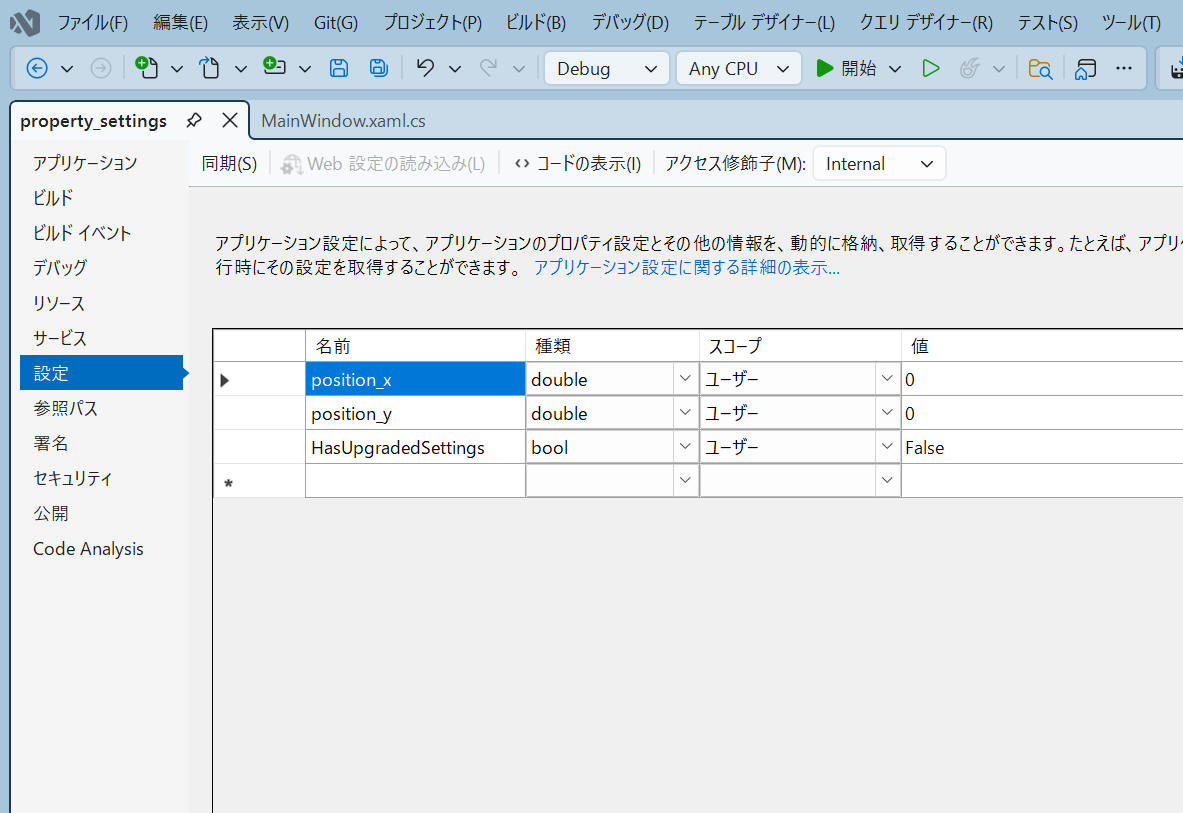
各パラメータの名前・種類・スコープ・初期値は、Visual Studio の設定 で登録します。(下図参照)
Visual Studio 設定例
実際に保存された user.config の例を以下に示します。
"AppData\Local\<Company>\<App>\<Version>\user.config" 例
<?xml version="1.0" encoding="utf-8"?>
<configuration>
    <userSettings>
        <property_settings.Properties.Settings>
            <setting name="position_x" serializeAs="String">
                <value>381.33333333333331</value>
            </setting>
            <setting name="position_y" serializeAs="String">
                <value>138</value>
            </setting>
            <setting name="HasUpgradedSettings" serializeAs="String">
                <value>True</value>
            </setting>
        </property_settings.Properties.Settings>
    </userSettings>
</configuration>
プログラムで Save() は必要ですが
Load() は不要(ありません)のようです。アプリケーション起動時に自動的に読み込みをしてくれます。
プログラム実行中に設定読み込みしたい場合は Reload()
を実行します。
初期値に戻したい場合は Reset() を実行します。
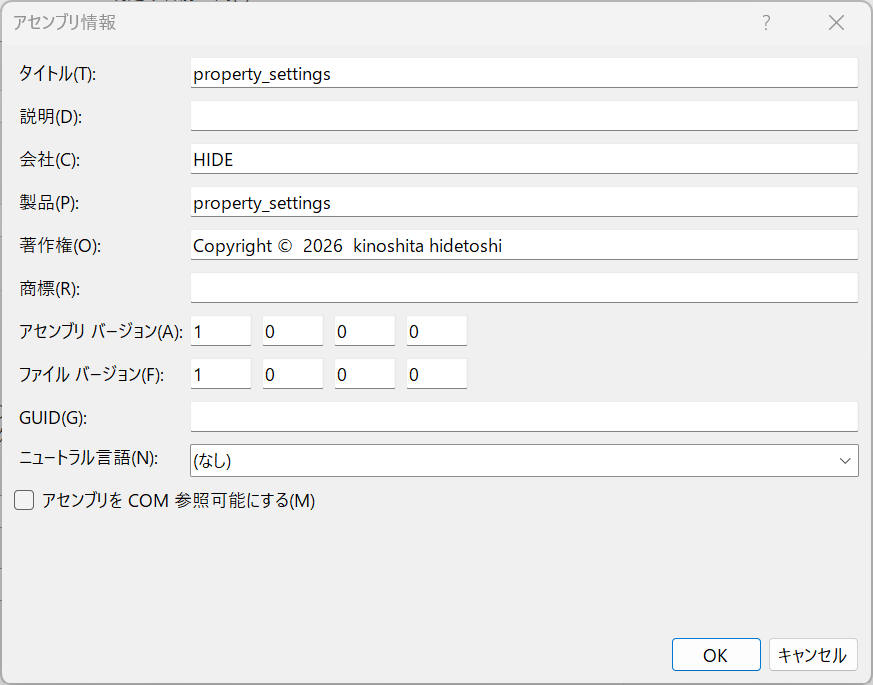
<Company>, <App>, <Version> は "アセンブリ情報" の "会社(C)" "製品(P)"
および "アセンブリバージョン(F)"
の情報を使用します。
アセンブリ情報
以上のようにとても簡単に機能を実現可能です。
2. Windows レジストリ
🔗
✔ 特徴
読み書きが高速
インストール不要のポータブルアプリでも使える
企業アプリでよく使われる
ただし「設定ファイルとして見えない」ためユーザー編集は面倒(regedit コマンドを使って閲覧・編集します)
レジストリ HKEY_CURRENT_USER に保存する例を以下に記載します。
例1 (WPF, c#): シンプルバージョン
HKEY_CURRENT_USER 中のパスは、通常以下のルールで作成します。
private const string RegistryPath = @"Software\<Company_Name>\<App_Name>";
下記例では以下のように記載しています。
private const string RegistryPath = @"Software\HIDE\windows_registry";
using Microsoft.Win32;
using System;
using System.Windows;

namespace windows_registry
{
    public partial class MainWindow : Window
    {
        private const string RegistryPath = @"Software\HIDE\windows_registry";

        public MainWindow()
        {
            InitializeComponent();
            LoadWindowState();
        }

        ///
        /// レジストリからウィンドウの状態を読み込む
        ///
        private void LoadWindowState()
        {
            try
            {
                using (RegistryKey key = Registry.CurrentUser.OpenSubKey(RegistryPath))
                {
                    if (key != null)
                    {
                        object left = key.GetValue("Left");
                        object top = key.GetValue("Top");
                        object width = key.GetValue("Width");
                        object height = key.GetValue("Height");

                        if (left != null && double.TryParse(left.ToString(), out double leftValue))
                        {
                            this.Left = leftValue;
                        }
                        if (top != null && double.TryParse(top.ToString(), out double topValue))
                        {
                            this.Top = topValue;
                        }
                        if (width != null && double.TryParse(width.ToString(), out double widthValue))
                        {
                            this.Width = widthValue;
                        }
                        if (height != null && double.TryParse(height.ToString(), out double heightValue))
                        {
                            this.Height = heightValue;
                        }
                    }
                }
            }
            catch (Exception ex)
            {
                System.Diagnostics.Debug.WriteLine($"レジストリ読み込みエラー: {ex.Message}");
            }
        }

        ///
        /// ウィンドウの状態をレジストリに保存する
        ///
        private void Window_Closing(object sender, System.ComponentModel.CancelEventArgs e)
        {
            try
            {
                using (RegistryKey key = Registry.CurrentUser.CreateSubKey(RegistryPath))
                {
                    if (key != null)
                    {
                        key.SetValue("Left", this.Left);
                        key.SetValue("Top", this.Top);
                        key.SetValue("Width", this.Width);
                        key.SetValue("Height", this.Height);
                    }
                }
            }
            catch (Exception ex)
            {
                System.Diagnostics.Debug.WriteLine($"レジストリ保存エラー: {ex.Message}");
            }
        }
    }
}
例2 (WPF, c#): 会社名・アプリケーション名をアセンブリ情報から取得
前章と同様に、アセンブリ情報から 会社名・アプリケーション名 を取得して使用する例を紹介します。
アセンブリ情報
例1 との差分箇所を色付けしておきます。
using Microsoft.Win32;
using System;
using System.Reflection;
using System.Windows;
namespace windows_registry
{
///
/// MainWindow.xaml の相互作用ロジック
///
public partial class MainWindow : Window
{
private string _registryPath;
public MainWindow()
{
InitializeComponent();
// アセンブリ情報から 会社名、アプリケーション名 を取得
string companyName = GetAssemblyAttribute<AssemblyCompanyAttribute >(a => a.Company);
string applicationName = GetAssemblyAttribute<AssemblyTitleAttribute >(a => a.Title);
// RegistryPath を動的に生成
_registryPath = "Software\\" + companyName + "\\" + applicationName;
// ウィンドウの状態をレジストリから読み込む
LoadWindowState();
}
///
/// アセンブリ属性から値を取得するヘルパーメソッド
///
private string GetAssemblyAttribute<T>(Func<T, string> valueSelector) where T : Attribute
{
try
{
Assembly assembly = Assembly.GetExecutingAssembly();
object[] attributes = assembly.GetCustomAttributes(typeof(T), false);
if (attributes.Length > 0)
{
return valueSelector((T)attributes[0]);
}
}
catch (Exception ex)
{
System.Diagnostics.Debug.WriteLine($"アセンブリ属性取得エラー: {ex.Message}");
}
return string.Empty;
}
///
/// レジストリからウィンドウの状態を読み込む
///
private void LoadWindowState()
{
try
{
using (RegistryKey key = Registry.CurrentUser.OpenSubKey(_registryPath))
{
if (key != null)
{
object left = key.GetValue("Left");
object top = key.GetValue("Top");
object width = key.GetValue("Width");
object height = key.GetValue("Height");
if (left != null && double.TryParse(left.ToString(), out double leftValue))
{
this.Left = leftValue;
}
if (top != null && double.TryParse(top.ToString(), out double topValue))
{
this.Top = topValue;
}
if (width != null && double.TryParse(width.ToString(), out double widthValue))
{
this.Width = widthValue;
}
if (height != null && double.TryParse(height.ToString(), out double heightValue))
{
this.Height = heightValue;
}
}
}
}
catch (Exception ex)
{
System.Diagnostics.Debug.WriteLine($"レジストリ読み込みエラー: {ex.Message}");
}
}
///
/// ウィンドウの状態をレジストリに保存する
///
private void Window_Closing(object sender, System.ComponentModel.CancelEventArgs e)
{
try
{
using (RegistryKey key = Registry.CurrentUser.CreateSubKey(_registryPath))
{
if (key != null)
{
key.SetValue("Left", this.Left);
key.SetValue("Top", this.Top);
key.SetValue("Width", this.Width);
key.SetValue("Height", this.Height);
}
}
}
catch (Exception ex)
{
System.Diagnostics.Debug.WriteLine($"レジストリ保存エラー: {ex.Message}");
}
}
}
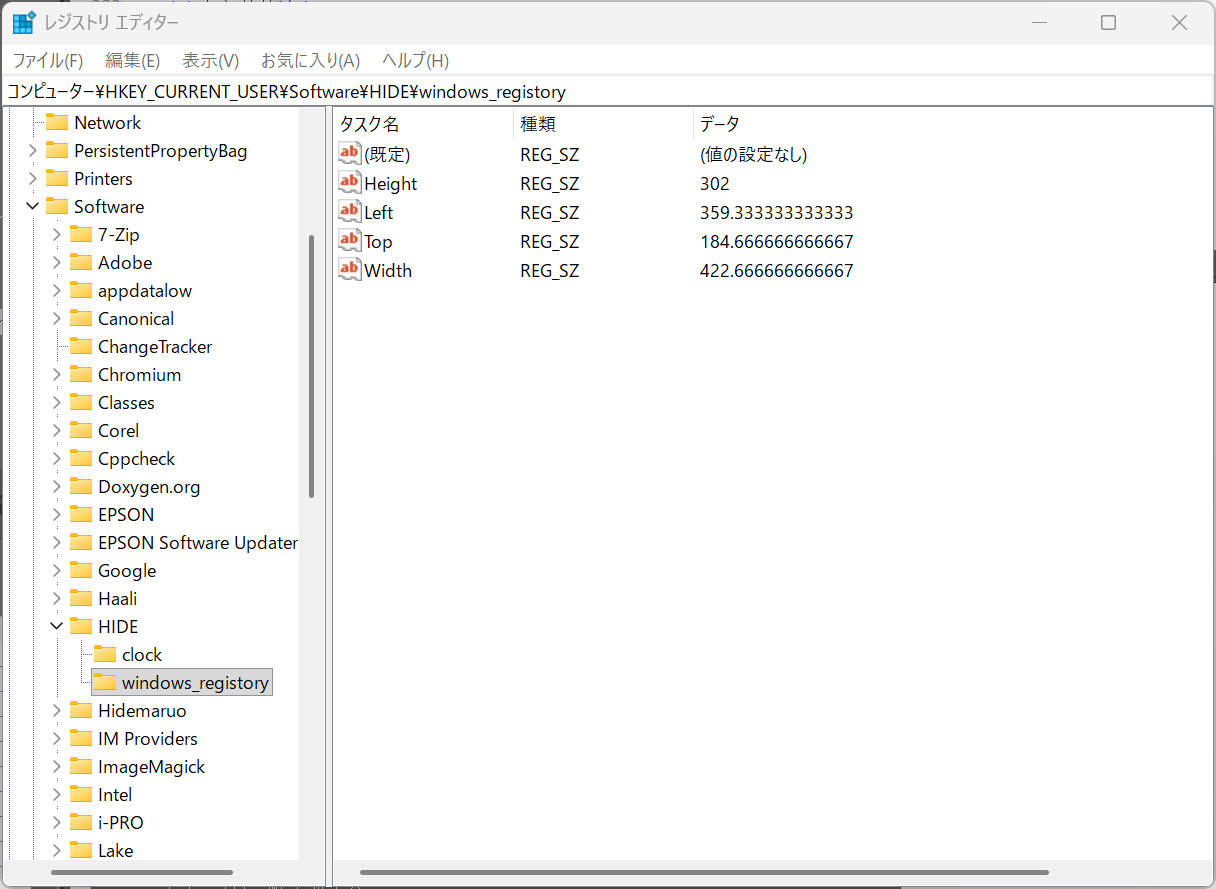
レジストリ保存例
✔ 特徴
設定ファイルが人間に読みやすい
Git で管理しやすい
複数ウィンドウの設定をまとめやすい
.NET Framework でも Newtonsoft.Json が使える
保存例 (c#)
var info = new WindowInfo
{
    Left = this.Left,
    Top = this.Top,
    Width = this.Width,
    Height = this.Height
};

string dir = Path.Combine(
    Environment.GetFolderPath(Environment.SpecialFolder.ApplicationData),
    "MyCompany", "MyApp");

if (!Directory.Exists(dir)) {
    Directory.CreateDirectory(dir);
}

string path = Path.Combine(dir, "settings.json");
File.WriteAllText(path, JsonConvert.SerializeObject(info));
✔ 特徴
.NET Framework 時代の標準
設定ファイルとしてユーザーが編集しやすい
JSON より冗長だが、企業アプリでは根強い
保存例 (c#)
var doc = new XDocument(
    new XElement("Window",
        new XElement("Left", this.Left),
        new XElement("Top", this.Top),
        new XElement("Width", this.Width),
        new XElement("Height", this.Height)
    )
);

string dir = Path.Combine(
    Environment.GetFolderPath(Environment.SpecialFolder.ApplicationData),
    "MyCompany", "MyApp");

if (!Directory.Exists(dir)) {
    Directory.CreateDirectory(dir);
}

string path = Path.Combine(dir, "settings.xml");
doc.Save(path);
✔ 特徴
レガシーアプリとの互換性が高い
軽量で高速
ただし .NET Framework では標準 API がないため P/Invoke が必要
保存例 (c#)
[DllImport("kernel32")]
private static extern long WritePrivateProfileString(string section, string key, string val, string filePath);

string dir = Path.Combine(
    Environment.GetFolderPath(Environment.SpecialFolder.ApplicationData),
    "MyCompany", "MyApp");

if (!Directory.Exists(dir)) {
    Directory.CreateDirectory(dir);
}

string path = Path.Combine(dir, "settings.ini");
WritePrivateProfileString("MainWindow", "Left", this.Left.ToString(), path);
本ページの情報は、特記無い限り下記 MIT ライセンスで提供されます。
The MIT License (MIT)