[Git] AIが作成したコーディングステップ数をカウントする方法
[評価環境1]
Git :
2.53.0
OS :
Ubuntu,
24.04 (WSL)
ターミナル :
GNU bash,
version 5.2.21
[評価環境2]
Git :
2.53.0
OS :
Windows 11,
24.04 (WSL)
ターミナル :
PowerShell,
5.1.26100.7920
2つのコミット間の「コミット一覧」を出力する方法を記載します。
<commit1> の次のコミットから
<commit2> までが対象となります。
コマンド: git log <commit1> .. <commit2> --oneline
具体例:
$ git log d8fc8494..HEAD --oneline
dfbd4b2 (HEAD -> feature/AI_trial) [AI-gen] 四則演算機能の実装とユニットテストを追加
d3e9f3b [AI-gen] README.md を改善
26ac19e (origin/main, origin/HEAD, main) 修正
63e424d GitHub Copilot 提案を適用
21d7330 README.md 更新
2924810 typo 修正
ca6dc3e スペル誤り修正: calcurator > calculator
93836ac 環境変数名を変更、他
a79fe1f 整理
82fc67d 更新
f5305b5 表記形式を変更
6a5cb5e 更新
$
指定したコミット間の変更ステップ数をカウントする方法を記載します。
下記コマンドは、2つのコミット間で「何行追加され、何行削除され、何ファイルが変更されたか」を一行で要約して表示するコマンドです。
<commit1> の次のコミットから
<commit2> までが対象となります。
コマンド: git diff --shortstat <commit1> <commit2>
具体例:
$ git diff --shortstat d8fc8494 d3e9f3bd
 11 files changed, 166 insertions(+), 42 deletions(-)
$
指定したコミット間の変更ステップ数をカウントする方法を記載します。
下記コマンドは、2つのコミット間で「何行追加され、何行削除され、何ファイルが変更されたか」を一行で要約して表示するコマンドです。
<commit1> の次のコミットから
<commit2> までが対象となります。
コマンド (Linux shell):
git diff --numstat <commit1> <commit2> | awk '{ files++; add+=$1; del+=$2 }
END { print "files:", files, "added:", add, "deleted:", del, "total:", add+del }'
具体例 (Linux shell):
$ git diff --numstat dccfd079 d3e9f3bd | awk '{ files++; add+=$1; del+=$2 }
END { print "files:", files, "added:", add, "deleted:", del, "total:", add+del }'
files: 11 added: 167 deleted: 40 total: 207
$
コマンド (Windows PowerShell):
$files=0;$add=0;$del=0;git diff --numstat <commit1> <commit2> | %{ $c =$_ -split "`t"; if($c.Count -eq 3 -and $c[0] -ne '-' -and $c[1] -ne '-'){ $files++; $add+=[int]$c[0]; $del+=[int]$c[1] } }; "files: $files added: $add deleted: $del total: $($add+$del)"
具体例 (Windows PowerShell):
> $files=0;$add=0;$del=0;git diff --numstat dccfd079 d3e9f3bd | %{ $c =$_ -split "`t"; if($c.Count -eq 3 -and $c[0] -ne '-' -and $c[1] -ne '-'){ $files++; $add+=[int]$c[0]; $del+=[int]$c[1] } }; "files: $files added: $add deleted: $del total: $($add+$del)"
files: 11 added: 167 deleted: 40 total: 207
>
コミットタイトルのプレフィックスに [AI-gen]
を含むコミットのみをカウント対象とする方法を記載します。
--grep="^\[AI-gen\]" 中の
^ が文字列先頭(プレフィックス)を指定する記号です。
Linux
コマンド (Linux shell):
git log <commit1>..<commit2> --grep="^\[AI-gen\]" --pretty=format:"%H%n" | \
grep -v '^$' | \
while IFS= read -r hash; do
    git diff --numstat ${hash}^ ${hash}
done | awk '{ files++; add+=$1; del+=$2 }
END { print "files:", files, "added:", add, "deleted:", del, "total:", add+del }'
具体例 (Linux shell):
$ git log dccfd079..d3e9f3bd --grep="^\[AI-gen\]" --pretty=format:"%H%n" | \
grep -v '^$' | \
while IFS= read -r hash; do
    git diff --numstat ${hash}^ ${hash}
done | awk '{ files++; add+=$1; del+=$2 }
END { print "files:", files, "added:", add, "deleted:", del, "total:", add+del }'
files: 1 added: 103 deleted: 12 total: 115
$
Bash シェルスクリプト: "count-ai-steps.sh"
#!/usr/bin/env bash

set -euo pipefail

from="dccfd079"
to="HEAD"
keyword="^\[AI-gen\]"

git log "${from}".."${to}" --grep="${keyword}" --pretty=format:"%H%n" | \
grep -v '^$' | \
while IFS= read -r hash; do
    git diff --numstat "${hash}^" "${hash}"
done | awk '{ files++; add+=$1; del+=$2 }
END { print "files:", files, "added:", add, "deleted:", del, "total:", add+del }'
Windows
コマンド (Windows PowerShell):
$from='<commit1>';$to='<commit2>';$grep='^\[AI-gen\]';$hashes=git log "$from..$to" --grep="$grep" --pretty=format:"%H%n"|?{$_ -and $_.Trim() -ne ''};$files=0;$add=0;$del=0;foreach($hash in $hashes){git diff --numstat "$hash^" $hash|%{ $c=$_ -split "`t",3; if($c.Count -ge 2){$files++;$a=0;$d=0;[void][int]::TryParse($c[0],[ref]$a);[void][int]::TryParse($c[1],[ref]$d);$add+=$a;$del+=$d}}};"files: $files added: $add deleted: $del total: $($add+$del)"
具体例 (Windows PowerShell):
> $from='dccfd079';$to='d3e9f3bd';$grep='^\[AI-gen\]';$hashes=git log "$from..$to" --grep="$grep" --pretty=format:"%H%n"|?{$_ -and $_.Trim() -ne ''};$files=0;$add=0;$del=0;foreach($hash in $hashes){git diff --numstat "$hash^" $hash|%{ $c=$_ -split "`t",3; if($c.Count -ge 2){$files++;$a=0;$d=0;[void][int]::TryParse($c[0],[ref]$a);[void][int]::TryParse($c[1],[ref]$d);$add+=$a;$del+=$d}}};"files: $files added: $add deleted: $del total: $($add+$del)"
files: 1 added: 103 deleted: 12 total: 115
>
PowerShell シェルスクリプト: "count-ai-steps.ps1"
$from='dccfd079'
$to='HEAD'
$keyword='^\[AI-gen\]'

$hashes=git log "$from..$to" --grep="$keyword" --pretty=format:"%H%n" | Where-Object {$_ -and $_.Trim() -ne ''}

$files=0; $add=0; $del=0

foreach ($hash in $hashes){
    git diff --numstat "$hash^" $hash | ForEach-Object{
        $c=$_ -split "`t",3
        if ($c.Count -ge 2){
            $files++
            $a=0
            $d=0
            [void][int]::TryParse($c[0],[ref]$a)
            [void][int]::TryParse($c[1],[ref]$d)
            $add+=$a
            $del+=$d
        }
    }
}

"files: $files added: $add deleted: $del total: $($add+$del)"
“コミットした人” を検索条件に追加可能です。
詳細は下記サンプルを参照ください。
注意
author に記載するテキストは 正規表現 です。メールアドレス中に
. を含む場合、 \.
というようにエスケープが必要です。
Linux
Bash シェルスクリプト: "count-ai-steps_with_author.sh"
#!/usr/bin/env bash

set -euo pipefail

from="dccfd079"
to="HEAD"
keyword="^\[AI-gen\]"
author="^kinoshita hidetoshi <kinoshita\.hidetoshi@google\.com>$"   # 完全一致
#author="kinoshita hidetoshi"   # 部分一致
#author="kinoshita\.hidetoshi@google\.com"   # 部分一致

git log "${from}".."${to}" --author="${author}" --grep="${keyword}" --pretty=format:"%H%n" | \
grep -v '^$' | \
while IFS= read -r hash; do
    git diff --numstat "${hash}^" "${hash}"
done | awk '{ files++; add+=$1; del+=$2 }
END { print "files:", files, "added:", add, "deleted:", del, "total:", add+del }'
Windows
PowerShell シェルスクリプト: "count-ai-steps_with_author.ps1"
$from='dccfd079'
$to='HEAD'
$keyword='^\[AI-gen\]'
$author='^kinoshita hidetoshi <kinoshita\.hidetoshi@google\.com>$'   # 完全一致
#$author='kinoshita hidetoshi'   # 部分一致
#$author='kinoshita\.hidetoshi@google\.com'   # 部分一致

$hashes=git log "$from..$to" --author="$author" --grep="$keyword" --pretty=format:"%H%n" | Where-Object {$_ -and $_.Trim() -ne ''}

$files=0; $add=0; $del=0

foreach ($hash in $hashes){
    git diff --numstat "$hash^" $hash | ForEach-Object{
        $c=$_ -split "`t",3
        if ($c.Count -ge 2){
            $files++
            $a=0
            $d=0
            [void][int]::TryParse($c[0],[ref]$a)
            [void][int]::TryParse($c[1],[ref]$d)
            $add+=$a
            $del+=$d
        }
    }
}

"files: $files added: $add deleted: $del total: $($add+$del)"
Git コミットタイトル先頭に [AI]
[HUMAN] など固定キーワードを挿入するのって忘れてしまいそうですよね。"Git
hooks" という仕組みを使用することで、メッセージ規約を強制することができます。
Git hooks とは:
Git hooks は、Git の特定イベントに合わせて自動実行されるスクリプトです。
commit 前に整形、Lint実施、テスト実行 (pre-commit)
コミットメッセージのルール強制 (commit-msg)
push 前に CI 相当のチェック (pre-push)
merge/rebase 時の検査 (post-merge, re-rebase)
代表的な hooks 一覧(よく使うもの):
[table.] simple table のサンプル1
フック
タイミング
主用途
pre-commit
コミット作成の直前
フォーマット、Lint, 秘密情報検査、差分検査
commit-msg
コミットメッセージ確定前
メッセージ規約(Jira キー、[AI] 等)
prepare-commit-msg
エディタ起動前
メッセージ自動生成、テンプレート挿入
pre-push
push 直前
テスト、ブランチ名規約、禁止ブランチガード
post-checkout
checkout 後
依存更新、サブモジュール更新、生成物同期
post-merge
merge 後
依存更新、サブモジュール更新、生成物同期
以下、commit-msg を使って git コミットメッセージ先頭に
[AI] または [HUMAN]
の記載を強制化する方法を記載します。
Linux (Ubuntu):
1. リポジトリの ".git/hooks/commit-msg" に以下のスクリプトを保存します。
#!/usr/bin/env bash
set -euo pipefail

msg_file="$1"
first_line="$(head -n 1 "$msg_file" | tr -d '\r')"

# マージコミットやリバートなどを除外したい場合はここで許可
# 例: Merge / Revert を許可する
if [[ "$first_line" =~ ^Merge\  ]] || [[ "$first_line" =~ ^Revert\  ]]; then
  exit 0
fi

if [[ ! "$first_line" =~ ^\[(AI|HUMAN)\]\  ]]; then
  echo "ERROR: コミットメッセージ先頭は [AI] または [HUMAN] で始めてください。" >&2
  echo "例: [AI] Fix dewarp edge case" >&2
  echo "例: [HUMAN] Refactor stitching pipeline" >&2
  exit 1
fi
2.".git/hooks/commit-msg" に実行権限を付与します。
$ chmod +x ./git/hooks/commit-msg
以上で設定完了です。
Windows:
1. リポジトリの ".git/hooks/commit-msg" に以下のスクリプトを保存します。文字コードを UTF-8
で保存します。
#!/bin/sh
set -euo pipefail

msg_file="$1"
first_line="$(head -n 1 "$msg_file" | tr -d '\r')"

# マージコミットやリバートなどを除外したい場合はここで許可
# 例: Merge / Revert を許可する
if [[ "$first_line" =~ ^Merge\  ]] || [[ "$first_line" =~ ^Revert\  ]]; then
  exit 0
fi

if [[ ! "$first_line" =~ ^\[(AI|HUMAN)\]\  ]]; then
  echo "ERROR: コミットメッセージ先頭は [AI] または [HUMAN] で始めてください。" >&2
  echo "例: [AI] Fix dewarp edge case" >&2
  echo "例: [HUMAN] Refactor stitching pipeline" >&2
  exit 1
fi
以上で設定完了です。
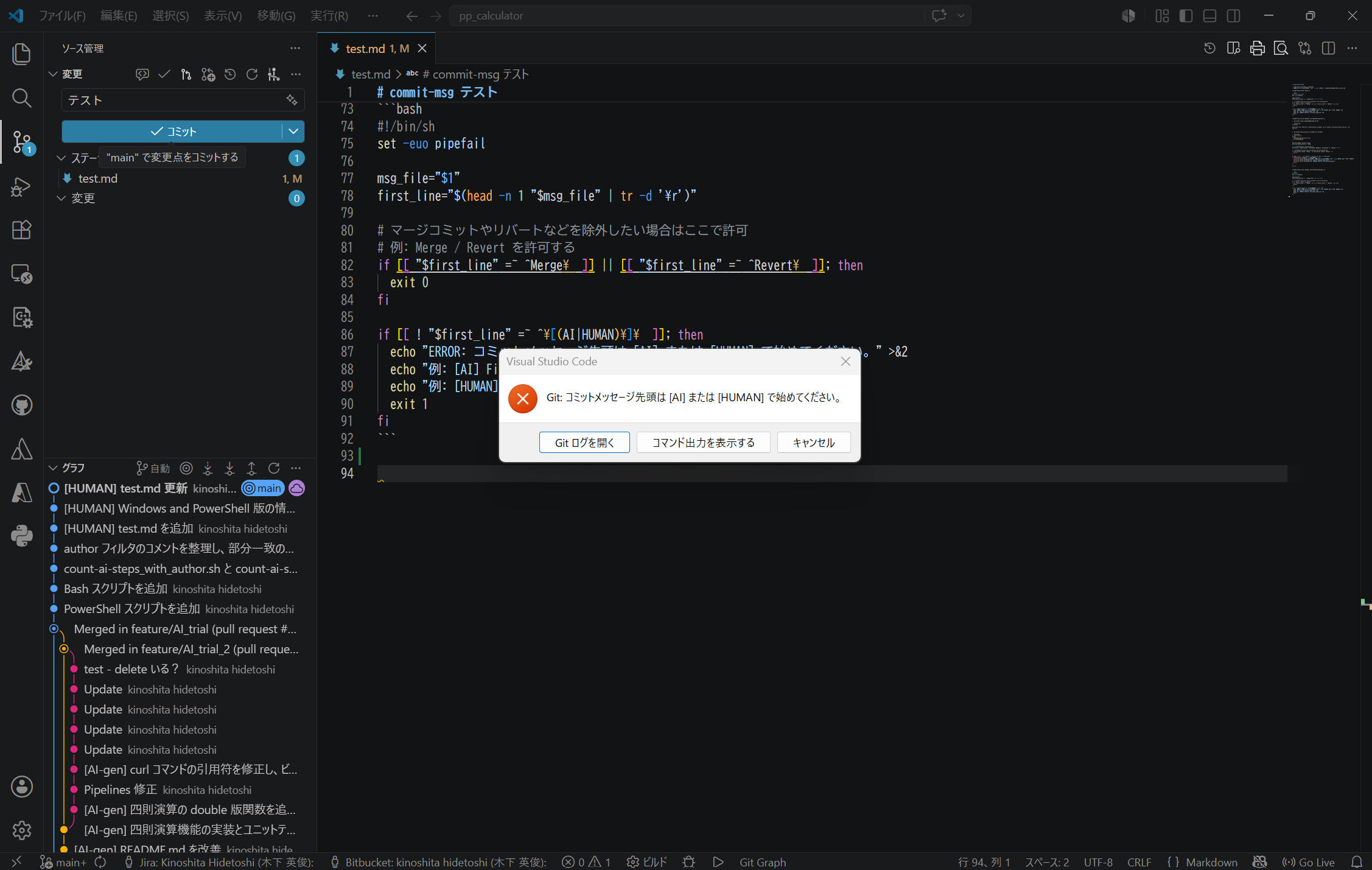
ではコミット実行してみます。
コミットタイトルを「テスト」としてコミット操作すると、下図のような画面を表示しました。期待通りに動作していることを確認できました。
コミットNG 例
Pull Request の扱いによっては注意が必要:
[AI-gen] を付けるとダブルカウントされました。 Squash
の場合、元のコミット記録が削除されてしまうので、Pull Request
タイトルに [AI-gen] を付けてカウント対象として扱う必要がありそうです。
[AI-gen] を付けない、という運用が良さそうです。
本ページの情報は、特記無い限り下記 MIT ライセンスで提供されます。
The MIT License (MIT)