std::async (c++11)
std::async は、C++11
で導入された非同期処理のための関数テンプレートです。
バックグラウンドで関数を非同期に実行し、その結果を std::future
経由で取得することができます。
C++標準には、非同期処理を行う方法に std::thread, std::jthread,
std::async の3つがあります。
最初にこの3つについて概要を記載します。
🦊 参考(選び方の目安)
|
目的 |
推奨される選択肢 |
| スレッドを完全に制御したい |
std::thread |
| 安全にスレッドを扱いたい |
std::jthread |
| 戻り値が必要な非同期処理を簡単に書きたい |
std::async |
🧵 std::thread
| 特徴 |
最も基本的なスレッド。スレッドの生成と管理を自分で行う。 |
| 利点 |
細かい制御が可能(スレッドのライフサイクル、優先度など) |
| 注意点 |
-
join() や
detach()
を忘れると未定義動作になる
- スレッド終了の管理が手動で面倒
|
| 使いどころ |
スレッドの寿命や動作を細かく制御したいとき |
🌿 std::jthread
| 特徴 |
std::thread
の改良版。スレッド終了時に自動で join() してくれる |
| 利点 |
- リソースリークの心配が少ない(RAIIで自動管理)
stop_token によるキャンセル機構が組み込まれている
|
| 注意点 |
- C++20以降が必要
- 一部の環境ではまだ完全にサポートされていないかも
|
| 使いどころ |
スレッドのキャンセルや自動管理が欲しいとき。
C++20 を使えるなら std::thread
よりこちらの方が安全。 |
⚡ std::async
| 特徴 |
関数を非同期に実行し、std::future
で結果を取得。 |
| 利点 |
- 戻り値を簡単に取得できる
- スレッド管理が不要
- リソースリークの心配が少ない(RAIIで自動管理)
|
| 注意点 |
-
実行ポリシー
(std::launch::async or
std::launch::deferred) に注意。実装依存でスレッドが作られないこともある。
-
std::launch::async を使って新しいスレッドを起動した場合、future
の get()
や wait() を呼ばずに future
を破棄すると、スレッドがバックグラウンドで動いたままになる可能性がある。
-
std::launch::deferred の場合、スレッドを作成しない。また、future
の get()
を呼ばないと関数自体が実行されない。
|
| 使いどころ |
「関数を非同期に呼び出して結果を待ちたい」ようなシンプルなケースに最適 |
以下、本ページでは std::async について記載します。
[概要]
std::async を使って、まずはシンプルなサンプルを作ってみます。
少し処理の重たい関数 calcurateSum() を準備して、これを
std::async で実行します。
[評価環境]
|
| コンパイラ : |
g++ (Ubuntu 13.3.0-6ubuntu2~24.04), |
13.3.0 |
|
| OS: |
Ubuntu 24.04 (WSL), |
|
|
[プログラムソース] "async_01.cpp"
#include <iostream>     // std::cout, std::endl
#include <vector>       // std::vector
#include <future>       // std::async, std::future
#include <chrono>       // chrono::seconds, chrono::milliseconds, chrono::microseconds
#include <thread>       // std::this_thread::sleep_for
#include <string>       // std::string
#include <functional>   // std::cref

/// @brief data の合計値を計算する
/// @param data : 合計値を計算するデータ
/// @return data の合計値
int calcurateSum(const std::vector<int>& data)
{
    int sum = 0;
    for (auto i : data) {
        // 重たい処理
        std::this_thread::sleep_for(std::chrono::milliseconds(2000));
        sum += i;
        std::cout << "sum = " << sum << std::endl;
    }

    //throw std::runtime_error("test");

    return sum;
}

/// @brief std::async (非同期処理) のサンプルコード
/// @return EXIT_SUCCESS
int main()
{
    std::vector<int> data = { 1, 2, 3, 4, 5 };

    // calcurateSum() 関数を実行する
    // 引数が const なので cref() を使用。変更可能な場合は ref() で参照渡し。
//  future<int> f = std::async( launch::async, calcurateSum, cref(data) );                     // 非同期実行
//  future<int> f = std::async( launch::deferred, calcurateSum, cref(data) );                  // 同期実行
//  future<int> f = std::async( launch::async | launch::deferred, calcurateSum, cref(data) );  // 非同期/同期 どちらでもOK
//  future<int> f = std::async( calcurateSum, cref(data));                                     // 非同期/同期 どちらでもOK
    auto f = std::async( std::launch::async, calcurateSum, cref(data));                        // auto による推奨の使用方法。非同期実行。
    try {
        if (f.wait_for(std::chrono::seconds(0)) == std::future_status::deferred) {
            // launch::deferred is selected.
            std::cout << "data の合計値は " << f.get() << "です" << std::endl;
        }
        else {
            // launch::async is selected.
            while (1) {
                if ( f.wait_for(std::chrono::milliseconds(500)) == std::future_status::ready ) {
                    std::cout << "data の合計値は " << f.get() << "です" << std::endl;
                    break;
                }
                else {
                    std::cout << "wait..." << std::endl;
                }
            }
        }
    }
    catch (const std::exception& ex) {
        std::cout << "exception catched: " << ex.what() << std::endl;
    }
    catch (...) {
        std::cout << "exception catched." << std::endl;
    }

    return EXIT_SUCCESS;
}
ビルド方法:
$ g++ -std=c++20 -Wall -Wextra -Wpedantic -pthread -O2 async_01.cpp -o async_01.out
Makefile 例:
CXX := g++
CXXFLAGS := -std=c++23 -O2 -Wall -Wextra -Wpedantic -pthread

ifeq ($(DEBUG),1)
    CXXFLAGS += -g
endif

SRC := async_01.cpp
OUT := $(SRC:.cpp=.out)

.PHONY: all run clean help

all: $(OUT)

$(OUT): $(SRC)
	@printf "Compiling %s -> %s\n" "$<" "$@"
	$(CXX) $(CXXFLAGS) "$<" -o "$@"

run: $(OUT)
	@./$(OUT)

clean:
	@rm -f $(OUT)

help:
	@printf "Usage:\n"
	@printf "  make         Build async_01.cpp -> async_01.out\n"
	@printf "  make run     Build then run the binary\n"
	@printf "  make clean   Remove generated binary\n"
	@printf "  make help    Show this help message\n"
ビルドオプション説明:
| オプション |
説明 |
| -std=c++23 |
C++23 標準でコンパイルします。言語機能(構文・ライブラリ仕様)が C++23 準拠になります。 |
| -Wall |
一般的な警告群を有効にします。コード品質の初期チェックに有用です。 |
| -Wextra |
-Wall に含まれない追加の警告を有効にします。未使用パラメータなどを検出します。 |
| -Wpedantic |
規格に厳格に従っていない拡張や非標準的記法を警告します。移植性を高めたい場合に有効です。 |
| -pthread |
POSIX threads
のサポートを有効にし、スレッド関連のライブラリをリンクします。単に -lpthread をリンクするだけでなく、コンパイル時にスレッド対応(スレッドセーフな定義など)を有効にするフラグです。スレッド/ミューテックスなどを使うプログラムでは必須に近いオプションです(Linux)。 |
| -O2 |
最適化レベル 2 を指定します。実行速度向上のための最適化を行うが、"-O3" よりは穏やかで安定的な設定です。デバッグ時は
"-g -O0"
を推奨します。 |
実行結果:
$ ./async_01.out
wait...
wait...
wait...
sum = 1
wait...
wait...
wait...
wait...
sum = 3
wait...
wait...
wait...
wait...
sum = 6
wait...
wait...
wait...
wait...
sum = 10
wait...
wait...
wait...
wait...
sum = 15
data の合計値は 15です
$
補足説明:
- std::async の第一引数に launch::async を指定した場合、内部的にスレッドを生成して非同期の動作を行います。
std::async の第一引数に launch::deferred を指定した場合は同期実行します。通常の関数動作とお考え下さい。
std::async の第一引数を 無指定、または "launch::async |
launch::deferred" を指定した場合、どちらで実行しても良い、という意図になります。
std::async
を使用する時点で非同期実行を意図しているはずなので、通常は launch::async を明示的に指定することになるはずです。
- 非同期実行の場合、対象のタスクが終了しているかを確認してから結果を取得します。
上記例では "f.wait_for(chrono::milliseconds(500)) == std::future_status::ready"
の処理で最大 500ms の時間だけ処理完了を待ちます。その後 f.get() を実行することで処理結果を取得します。
- 同期実行であることが明確な場合は、状態を確認する必要ありません。同期実行の場合、f.get() を実行するまで処理自体が行われません。
- 非同期/同期 のどちらで実行しているかがわからない場合、両方を考慮したプログラム実装を行う必要があります。
プログラム品質を下げる原因となるので、特に理由なければ 同期/非同期 をちゃんと決めてプログラムの実装とテストを行う方が良いでしょう。
参考URL:
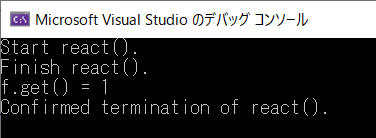
一時停止状態のシステムスレッドを作成してみます。
すなわち、スレッドで何かを処理する時が来たらすぐに開始できるように、あらかじめスレッドを作成しておき、スレッドの作成によるオーバーヘッドによる遅延を回避する例です。または、実行開始前にスレッドに何かしらの設定を行う必要があるため、一時停止状態のスレッドを作成する場合もあるでしょう。
スレッドを一度だけ一時停止状態にしたい場合は、void な future を用いるのが妥当な選択です。この技法の要点を以下に示します。
[評価環境]
|
| コンパイラ : |
Visual Studio 2019 pro., |
Version 16.3.10 |
|
| OS: |
Windows10 home, |
Version 1909 |
|
[プログラムソース] "async_02.cpp"
#include <iostream>
#include <future>		// std::async

using namespace std;

int react( int count )
{
    cout << "Start react()." << endl;
    for (int i = 0; i < count; ++i) {
        this_thread::sleep_for(chrono::milliseconds(1000));
    }
    cout << "Finish react()." << endl;
    return 1;
}

int main()
{
    promise<void> p;
    int wait_count = 5;

    future<int> f = async(launch::async, [=,&p]
    {
      p.get_future().wait();                                // p.set_value() の実行まで待機
      return react(wait_count);                             // react() を実行
    });

    this_thread::sleep_for(chrono::seconds(1));             // 何か…をしてから、
    p.set_value();                                          // スレッドを起動します。

    cout << "f.get() = " << f.get() << endl;                // react() の完了を待って戻り値を取得
    cout << "Confirmed termination of react()." << endl;
}
[実行結果]
参考
[概要]
std::thread だと join または detatch が必須です。
std::async の場合は detatch
に相当する機能がないけれど、終了確認せずに worker スレッドを放置したらどうなるのでしょうか。
確認してみました。
[環境]
|
| コンパイラ : |
Visual Studio 2019 pro., |
Version 16.6.0 |
|
| OS: |
Windows10 home, |
Version 1909 |
|
[プログラムソース] "async_03.cpp"
#include <iostream>
#include <vector>   // vector
#include <chrono>   // chrono
#include <thread>   // this_thread
#include <future>   // async, future, future_status

#include <windows.h>    // OuputDebugString
#include <tchar.h>      // _T

using namespace std;


int worker(const vector<int>& data)
{
    int sum = 0;

    for (int i : data) {
        // 重たい処理
        this_thread::sleep_for(chrono::milliseconds(2000));
        sum += i;
        cout << "sum = " << sum << endl;
    }

    //throw std::wstring(L"test");

    return sum;
}


int main()
{
    vector<int> data = { 1, 2, 3, 4, 5 };

    // worker() 関数を実行する
    future<int> f = std::async( launch::async, worker, ref(data) );                     // 非同期実行

    // このまま worker スレッドの終了を待たずに終了... どうなる?
    // std::thread なら join または detatch が必要だけど...
    cout << "[INF] Finish main task." << endl;

    return EXIT_SUCCESS;
}
[実行結果]
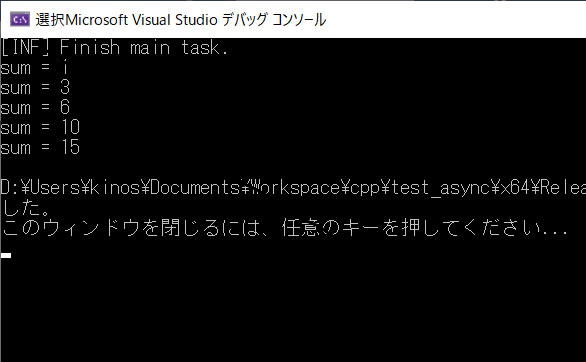
結論:
どうやら特に考慮は不要のようです。
main タスクが終了しても std::async タスクの動作は継続しました。
逆に
main() が終了したにもかかわらず async タスク側が残ってしまう場合もあるので、必要に応じて main タスク終了時に別スレッドを適切に終了するという処理が必要そうです。
本ページの情報は、特記無い限り下記 MIT ライセンスで提供されます。
MIT License
Copyright (c) 2017 Kinoshita Hidetoshi
Permission is hereby granted, free of charge, to any person obtaining a copy
of this software and associated documentation files (the "Software"), to deal
in the Software without restriction, including without limitation the rights
to use, copy, modify, merge, publish, distribute, sublicense, and/or sell
copies of the Software, and to permit persons to whom the Software is
furnished to do so, subject to the following conditions:
The above copyright notice and this permission notice shall be included in all
copies or substantial portions of the Software.
THE SOFTWARE IS PROVIDED "AS IS", WITHOUT WARRANTY OF ANY KIND, EXPRESS OR
IMPLIED, INCLUDING BUT NOT LIMITED TO THE WARRANTIES OF MERCHANTABILITY,
FITNESS FOR A PARTICULAR PURPOSE AND NONINFRINGEMENT. IN NO EVENT SHALL THE
AUTHORS OR COPYRIGHT HOLDERS BE LIABLE FOR ANY CLAIM, DAMAGES OR OTHER
LIABILITY, WHETHER IN AN ACTION OF CONTRACT, TORT OR OTHERWISE, ARISING FROM,
OUT OF OR IN CONNECTION WITH THE SOFTWARE OR THE USE OR OTHER DEALINGS IN THE
SOFTWARE.
|